v0.14.0: Your AI Prompts Are Not Yours — Until Now

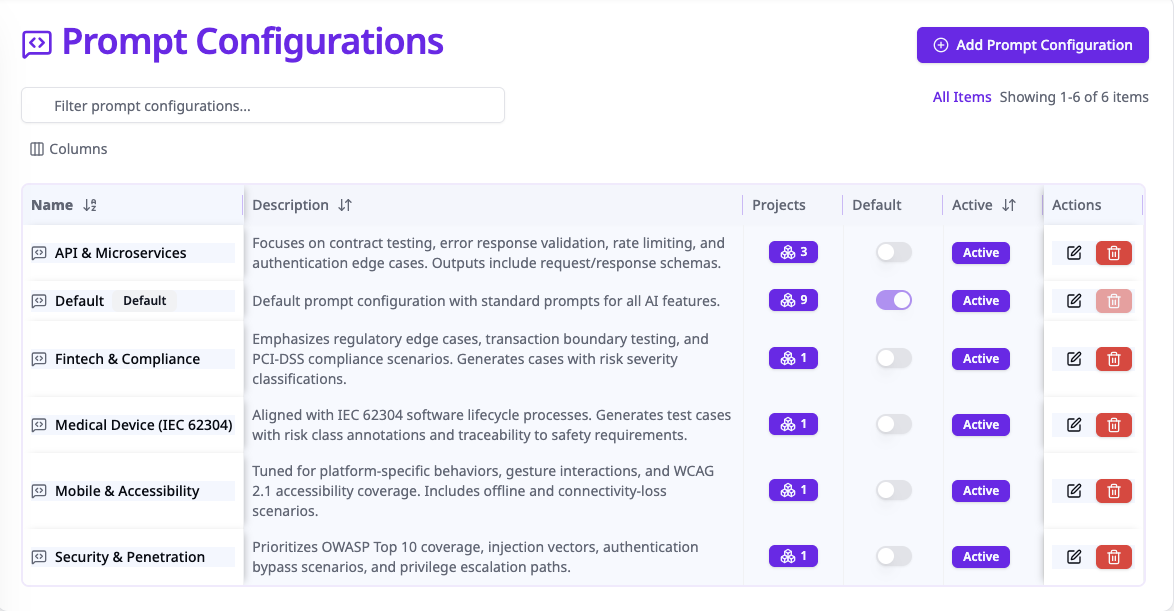
A few weeks ago, I wrote about bringing your own LLM — choosing your model, using your API key, keeping your data on your infrastructure. But choosing your model was only half the equation. You still couldn't easily tune the prompts that shaped the output.
With v0.14.0, TestPlanIt ships with a full prompt configuration system — every AI prompt visible, editable, and customizable per project, directly in the admin UI.
The Problem With Invisible Prompts
Every other AI-powered test management tool works the same way: the vendor writes the prompts, ships them in a binary you can't inspect, and hopes they work for your use case. If they don't? File a feature request and wait.
But one prompt does not fit all. A fintech team needs test cases that account for regulatory edge cases. A medical device team needs output aligned with IEC 62304. A mobile team needs accessibility and platform-specific coverage. Generic prompts can't serve any of them well.
What's New in v0.14.0
TestPlanIt now exposes every AI prompt through a dedicated admin interface — no hidden system instructions, no magic strings buried in server code.
Five Configurable AI Features
- Test Case Generation — Generate structured test cases from requirements or user stories. Control the system prompt, user prompt template, temperature, and token limits.
- Markdown Test Case Parsing — Convert markdown documents into structured test cases.
- Smart Test Case Selection — Select relevant test cases for test runs based on context.
- Editor Writing Assistant — In-editor AI for improving descriptions, steps, and expected results.
- LLM Connection Test — Even the connection test prompt is configurable.
For each feature, you control four parameters:
| Parameter | What It Does |
|---|---|
| System Prompt | Sets the AI's persona, testing methodology, and domain constraints |
| User Prompt | Template with {{placeholders}} for dynamic content |
| Temperature | Output randomness (0 = deterministic, 2 = creative) |
| Max Output Tokens | Caps response length to control costs |
Three-Level Resolution
Prompt resolution follows a three-tier chain:
- Project-specific — Your payments team can have completely different prompts than your mobile team.
- System default — Your organization's baseline when a project doesn't have its own config.
- Hard-coded fallback — Built-in prompts keep things working on fresh installs. AI never just breaks.
Start with the defaults and progressively customize as you learn what works.
Per-Project Customization
In a project's AI Models settings, assign a prompt configuration. Each project gets AI output shaped for its specific domain — without affecting anyone else. Combined with per-project LLM providers, you control both the model and the instructions it receives.
The Open Source Advantage
You won't find this in TestRail, Qase, or any other paid test management tool. Exposing prompts means admitting they're not magic — just a system prompt, a template, and a temperature setting. It also means supporting an infinite surface area of customer-modified configurations. No vendor product manager volunteers for that.
Open source changes the equation. The code and prompts are right there. If something doesn't work, you can inspect the resolution chain and debug it yourself. And if you improve a prompt — say you find a system instruction that produces better test cases for API or security testing — you can share it. Open a PR. Post it in Discord. The ecosystem benefits from one team's prompt engineering instead of that knowledge staying locked in a vendor's codebase.
Getting Started
- Admin → Prompt Configs (Tools & Integrations section) — review the defaults
- Create a new configuration for a specific team or domain
- Assign it to a project in Settings → AI Models
The defaults work well out of the box. Start there, run some generations, and tune iteratively.
The Bottom Line
Bring your own model and your own prompts. Every parameter is visible. Every prompt is editable. Every project can be different. And if the defaults work for you, you never have to touch any of it.
Your prompts. Your models. Your data. Your infrastructure.