Brad DerManouelian
TestPlanIt Contributor
View all authors

Introducing Automation Candidates: Which Manual Test Should You Automate Next?

· 4 min read
Brad DerManouelian
TestPlanIt Contributor

You have hundreds of manual test cases and finite bandwidth to automate them. Which ones first? Most teams answer by gut feel — or by whichever case failed last regression. But the case that runs in every regression and recovers an hour of tester time each run beats the one that bit you last sprint and won't bite again for six months. You can't see that on a list.

TestPlanIt now ships Automation Candidates — an AI-ranked report that tells you which manual cases to automate next, with a one-sentence rationale for every case explaining why it landed where it did. Pick a strategy, click Run.

Results You Can Defend: Required Fields, Edit Windows, and Justified Flips

· 4 min read
Brad DerManouelian
TestPlanIt Contributor

A test result is a claim: "this passed," "this run is done." When a release manager — or an auditor — asks who said so, when, and whether anyone changed it afterward, the answer needs to live in the tool.

This release gives that claim a backbone: required result fields that must be filled in, a configurable window for editing a recorded result, and an optional explanation when a completed outcome is flipped — with every edit captured in full, before-and-after detail.

Introducing Review & Approval: Sign-Off, Built Into the Workflow

· 4 min read
Brad DerManouelian
TestPlanIt Contributor
The reviewer inbox showing four pending review requests with their requesters, target workflow states, and approve / request changes / reject row actions.
The reviewer inbox surfaces pending approvals across every project a reviewer is assigned to — directly or via a role they hold.

Every QA team has the same rule, and every QA team breaks it. "Don't mark a case Active until the lead has looked at it." "Don't complete the sprint test run until the PM signs off." "Don't approve the session report unless someone double-checked the evidence."

The rule is in the wiki. It's in the new-hire onboarding. It's in someone's Slack DM history from last quarter. And every release cycle, somebody clicks the wrong button and a half-finished case ships as "Active," or a not-quite-done test run gets stamped "Complete" thirty seconds before the audit meeting starts.

It's not a tooling problem you can fix with another Confluence page. It's a tooling problem you fix by putting the gate inside the tool.

TestPlanIt v0.30.0 ships Review & Approval. Any workflow state can be marked as requires review. After that, transitioning into (or across) that state isn't a one-click operation anymore — it's a request that a designated reviewer either approves, sends back, or rejects.

Introducing Parameterized Test Cases: One Case, Many Runs, Real Coverage

· 8 min read
Brad DerManouelian
TestPlanIt Contributor
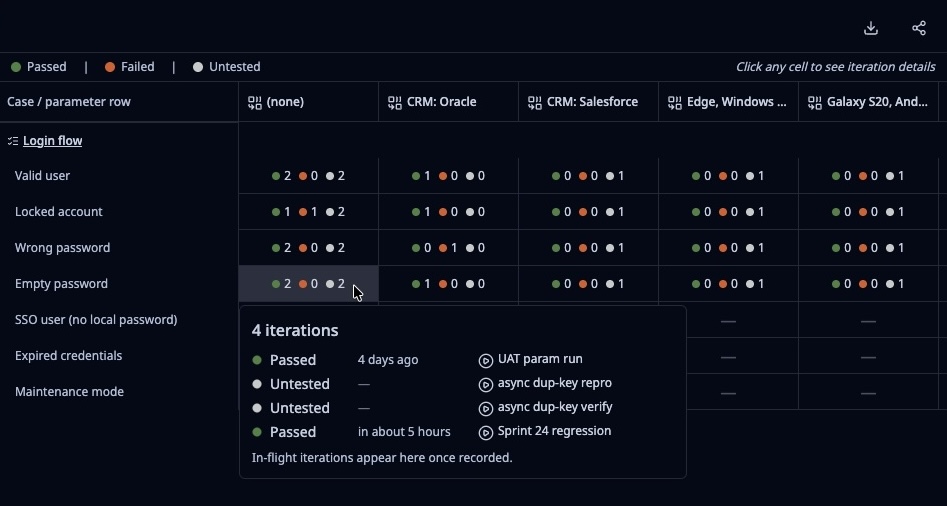
The Parameterized Test Iteration Matrix report focused on a Login case with seven parameter rows (Valid user, Locked account, Wrong password, Empty password, SSO user, Expired credentials, Maintenance mode) and configuration columns including CRM Oracle, CRM Salesforce, Edge Windows, and Galaxy S20. A hover popover on the Empty password / no-config cell shows the four runs that contributed: UAT param run, async dup-key repro, async dup-key verify, and Sprint 24 regression.
The Parameterized Test Iteration Matrix — one Login case, seven input scenarios, every configuration, every run that has ever touched it.

Every test team has the same shelf of near-duplicate test cases. "Login — valid user." "Login — empty password." "Login — wrong password." "Login — locked account." "Login — SSO user." Same steps, same expected outcomes, different inputs. Multiply that pattern across a typical product and the repository fills up with copies of the same test case wearing slightly different hats.

It's not a quality problem — those scenarios all matter. It's a maintenance problem. When the flow changes, you edit one case and forget the other six. When someone joins the team they can't tell which "Login" case is canonical. When a run completes, the report doesn't surface "which input combinations did we actually cover this sprint?"

TestPlanIt v0.29.0 ships parameterized test cases. Write the case once. Attach a table of input rows. Each row becomes an iteration with its own status — and the results roll up to a single case in your report.

If you're already using shared steps, this is the missing other half: shared steps reuse the same steps across many cases when the flow is identical; parameterized cases reuse the same case across many input rows when the steps stay the same but the data changes.

TestPlanIt Now Speaks 13 Languages

· 2 min read
Brad DerManouelian
TestPlanIt Contributor

Test management is a global discipline. Your QA team might be spread across São Paulo, Amsterdam, Warsaw, and Tokyo, and until now they've all been working in English whether they wanted to or not. That changes today.

TestPlanIt v0.27.0 ships full UI localization in 13 languages.

Introducing the TestPlanIt MCP Server: Talk to Your Test Data

· 5 min read
Brad DerManouelian
TestPlanIt Contributor

Most of the time, your AI assistant and your test management tool live in completely separate worlds. You're in Claude or Cursor, you want to know something about your test coverage, and you either have to go look it up yourself or paste a wall of data into the chat and hope the AI makes sense of it. The AI is smart but blind — it can't see your TestPlanIt data, so it can't actually help you with it.

The TestPlanIt MCP Server changes that.

Introducing Webhooks: Two-Way Sync with Your Issue Tracker and Anywhere Else

· 4 min read
Brad DerManouelian
TestPlanIt Contributor

Until now, the link between a TestPlanIt test case and a Jira ticket worked one direction at a time. You could click Sync to pull the latest status, or wait for the on-demand refresh. If a developer moved a ticket while you were running a test session, you wouldn't know until you went looking. And on the other side, telling Slack that a regression run failed, or letting a custom service know that a milestone closed, meant writing custom integration code that nobody had time to write.

This release ships webhooks. Issues sync the moment they change in your tracker, badges and lists update live without a page refresh, and TestPlanIt events fan out to Slack or any signed URL automatically.

Why Your Test Scripts Don't Belong in Your Test Case Management Tool

· 12 min read
Brad DerManouelian
TestPlanIt Contributor
Manage test cases separately from test scripts
Keep test cases in your TMS and test scripts in your source repository.

If you've evaluated a test management tool lately, you've seen this pitch: "Generate automated tests inside the tool." "Codeless automation — no scripting required." "AI-powered test creation."

And honestly? The pitch lands. One system, one login, one place to look. For a small team on a greenfield project, it even works for a while.

But it creates problems that only become obvious once you're deep enough in to care.