Find and Resolve Duplicate Test Cases and Steps
TestPlanIt v0.18.0 ships Duplicate Detection — two complementary features that help you keep your test suite lean as it grows.
Release notes and version updates
View All TagsTestPlanIt v0.18.0 ships Duplicate Detection — two complementary features that help you keep your test suite lean as it grows.
TestPlanIt v0.17.0 ships Copy/Move — select test cases or an entire folder, pick a target project, and transfer them directly. No export file, no import wizard, no field mapping. The cases arrive in the target project with their steps, custom fields, tags, issue links, and attachments intact.
Tags are one of those features that looks great in a demo and gets ignored in practice. The concept is solid: label your test cases, test runs, and sessions by area, type, or risk level so you can filter, group, and report on them meaningfully. The reality is that tagging is a manual chore, it's inconsistent across team members, and it's the first thing to slip when you're under pressure to get tests written and runs scheduled. So most repositories end up with either no tags or a sprawl of half-applied, differently-spelled labels that don't actually help anyone filter anything.
TestPlanIt v0.16.0 introduces Auto Tag — AI-powered tag suggestions that analyze your test cases, test runs, and sessions and propose relevant tags in bulk. Review the suggestions, accept what fits, and move on. Your existing tags are reused when they match; new ones are created when they don't.
Last week I wrote about why AI isn't killing manual QA — it's closing the gap between knowing what to test and expressing it as runnable code. That was the argument. Today we're shipping the solution.
TestPlanIt v0.15.0 introduces QuickScript, a new feature that converts your manual test cases into automation scripts for Playwright, Cypress, Selenium, pytest, Jest, and any other framework you use. Select cases from the Repository, pick a template, and export. QuickScript can generate complete, context-aware test files that reference your actual page objects, helpers, and utilities.

A few weeks ago, I wrote about bringing your own LLM — choosing your model, using your API key, keeping your data on your infrastructure. But choosing your model was only half the equation. You still couldn't easily tune the prompts that shaped the output.
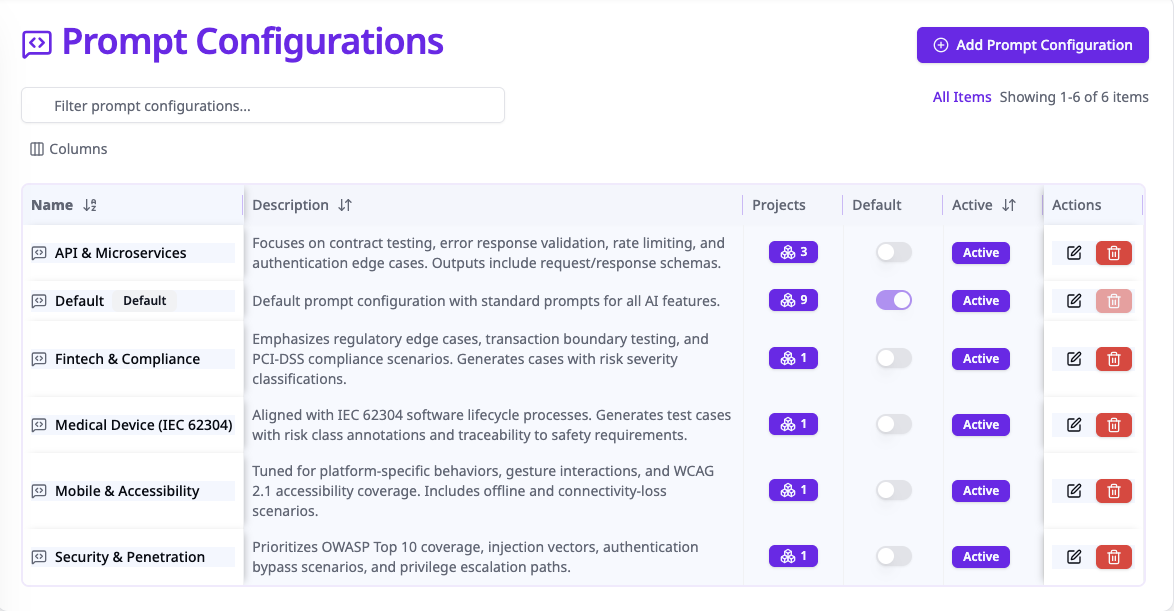
With v0.14.0, TestPlanIt ships with a full prompt configuration system — every AI prompt visible, editable, and customizable per project, directly in the admin UI.
TestPlanIt v0.13.x brings Markdown test case import, a revamped search experience, table support in the rich text editor, and a batch of UI stability improvements.
We're excited to announce TestPlanIt v0.12.0, bringing Microsoft (Azure AD) Single Sign-On and a brand-new Demo Project that helps new users explore TestPlanIt's features right out of the box.
We're excited to announce TestPlanIt v0.11.0, introducing Share Links - a new feature for securely sharing reports with team members, clients, and stakeholders without requiring them to have a TestPlanIt account.
We're excited to announce TestPlanIt v0.10.0. This version brings four new pre-built reports, enhanced version management, smooth UI transitions, and dozens of improvements to make your testing workflow more efficient.
We're excited to announce TestPlanIt v0.9.14, focused on improving your daily workflow with rich text editor enhancements, a new repository column, and streamlined folder navigation.